

client
Zoo Land
year
2024
service name
UX&UI Design, User Research, Visiual Design
budget
£20k
Project Duration
3 Weeks
01.
Intro of case
Zoo Simulator is an interactive, gamified dashboard that allows users to explore, monitor, and care for virtual zoo animals.
The experience blends education, entertainment, and management tools, giving users a playful yet functional interface for navigating animal stats, wellness, and habitat information.
02.
Work challenges
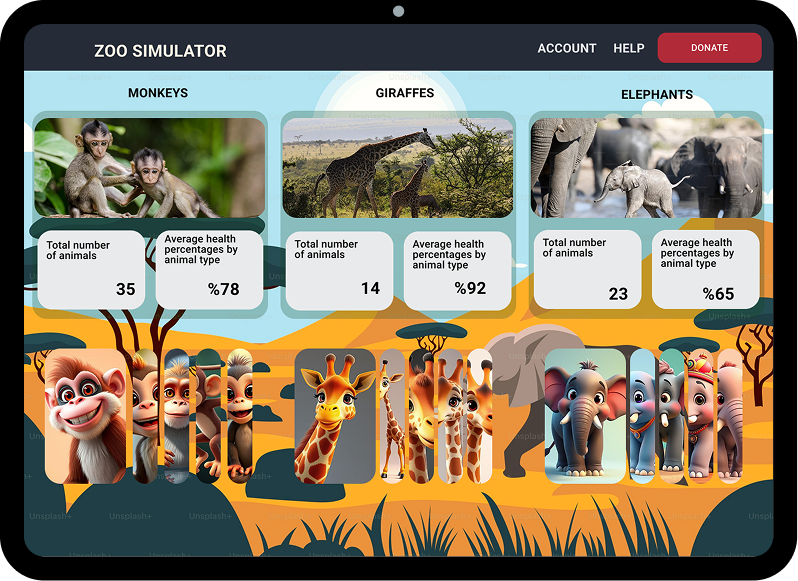
For Zoo Land, we designed a dashboard that provides a clear and intuitive overview of the main animal groups within the zoo environment. The interface is structured to make monitoring and exploring animal data simple, engaging, and visually organized.
The layout is divided into three main sections—Monkeys, Giraffes, and Elephants—each featuring a visual area, key information panels displaying total animals and average health, a species slider for quick browsing, and an “Explore” option that leads to more detailed insights. At the top, a clean header with the Zoo Land title and quick navigation supports easy orientation across the platform.
Our goal at Medy Design was to create a clean, user-friendly dashboard that allows users to easily monitor animal wellbeing, explore species information, and interact with zoo data while maintaining a strong visual hierarchy and playful experience. 🐘🐒🦒
03.
Main result
Zoo Land Simulator delivers an engaging and intuitive management experience where users can easily monitor and care for virtual zoo animals. The dashboard balances clear data visualization with playful, immersive design, allowing players to stay informed while feeling emotionally connected to the animals. By combining structured information with engaging visuals and storytelling elements, the experience encourages users to act as both caretakers and explorers within the virtual zoo. 🐾
Testing & Iteration After the initial design, we test the prototypes with actual users, gather feedback, and make iterative improvements until the experience is seamless. Implementation Support Once the final design is approved, we work closely with your development team to ensure the UX vision is accurately implemented in the final product.